






































SESLOC
Mobile App

SESLOC Mobile App
Account access on the go.
View balances, pay bills, deposit checks, transfer funds and more with your phone or tablet. The SESLOC Mobile App makes account access easy and convenient, and is available for iOS or Android.
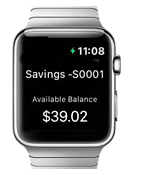
Get updates on your Apple Watch.
If you have an Apple Watch, you can get balance alerts and see the ten most recent transactions. To enable this feature, launch the SESLOC Mobile App, go to Menu > Settings > Apple Watch, then switch to On. You’re all set!
Please Note: Standard data rates from your wireless provider apply.
Need assistance?
If you need help with the SESLOC Mobile app, contact us at (805) 543-1816.
Online Banking Tips
From the News+ Blog

How to Pay Your SESLOC Mortgage
Making a payment on your SESLOC mortgage loan is quick and easy.

Direct Deposit Switch FAQ
Check out the most frequently asked questions about our Direct Deposit Switch tool.

7 Tips for Banking on the Go
Manage your accounts any time, anywhere with Online Banking and the Mobile App. You might already know you can pay your bills or transfer money, but did you know about these five handy tools?
 Savings are insured to at least $250,000 and backed by the full faith and credit of the U.S. government. National Credit Union Administration, a U.S. government agency.
